> ## Documentation Index
> Fetch the complete documentation index at: https://cortex-foundation-add13747-droid-2a5c5e50-docs-ferndesk-pro.mintlify.site/llms.txt
> Use this file to discover all available pages before exploring further.
# Cortex Chat
> The conversation product at cortex.foundation — projects, Library, plans, models, tools, Deep Research, images, and how a turn runs.
Cortex Chat is the assistant for research, writing, and everyday questions. It streams answers as they are written, keeps documents and threads together in projects, and hands off to Code or Bot when the job is a repository or a computer rather than a conversation.
Chat works before you sign in. Projects, files, memory, plans, and connections belong to a signed-in account.
 ## Start here
First message, attach a file, pick a model, keep the thread in a project.
Standing instructions, chats, and files kept together.
Built-in tools, connected apps, GitHub, and MCP servers.
## Finding your way around
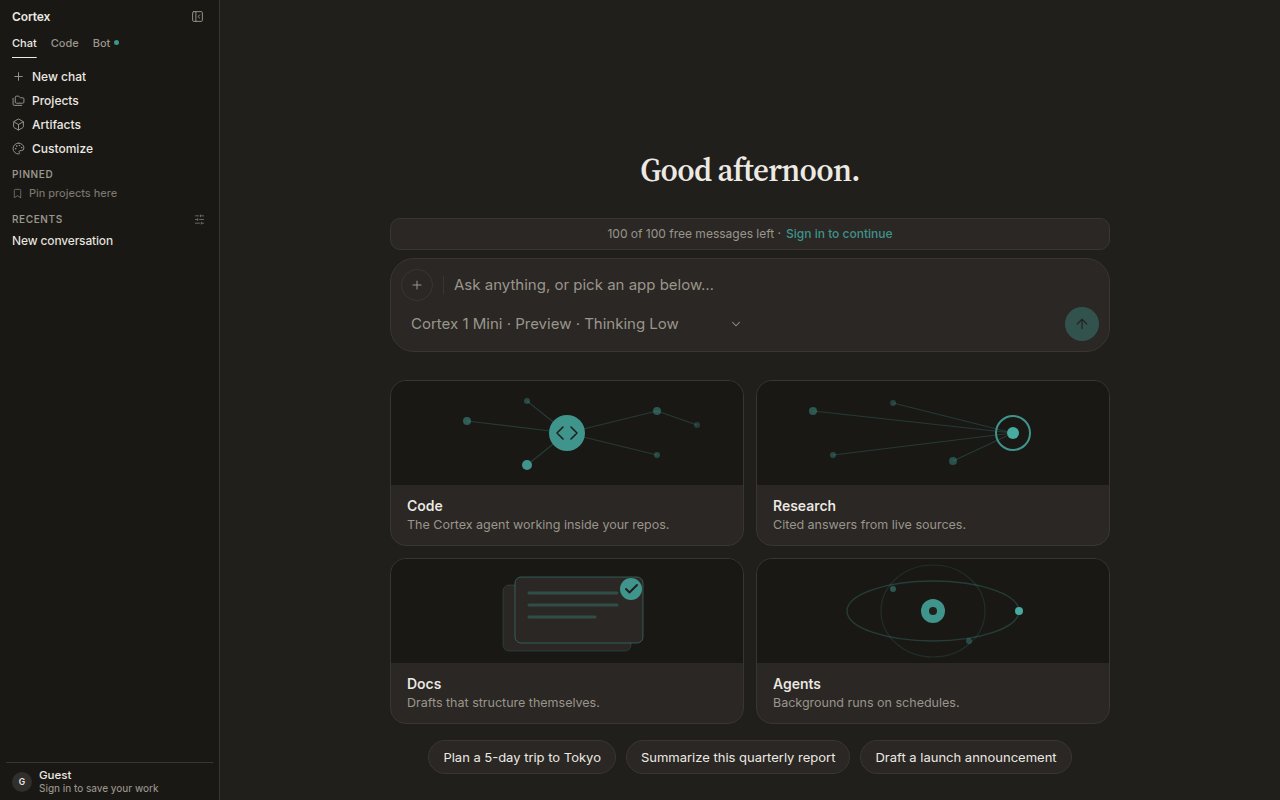
The sidebar holds everything Chat can open. Three of its entries are worth knowing before you start clicking.
| Entry | What it opens |
| --------------------- | ---------------------------------------------------------------------------------------------------------- |
| **Chat · Code · Bot** | The product switcher. Chat is the default; Code and Bot need a signed-in account. |
| **Projects** | Standing instructions plus the chats and files that belong together. See [Projects](/chat/projects). |
| **Artifacts** | Opens the [Library](/chat/library) — your uploads and everything the assistant produced. |
| **Customize** | **Connectors**: connect apps and choose whether each reaches Chat, Bot, or both. See [Tools](/chat/tools). |
| **Recents** | Your latest conversations. Guests see the current session only. |
**New chat** is an action, not a selected row. **Pinned** collects the projects you use most.
### The composer
* **+** opens **Attach file**, **Image**, and **Check origin**.
* The **model chip** — for example *Cortex 1 Mini · Preview · Thinking Low* — switches model, sets the Thinking level, and toggles **Deep Research**.
* **Enter** sends, **Shift + Enter** adds a line, **Esc** stops a response.
* While a turn runs the placeholder reads **Cortex is responding…** and the send button becomes a stop control.
### The four cards on Chat home
They are shortcuts, not separate products.
| Card | What it does |
| ------------------------------------------------------- | ------------------------------------------------- |
| **Code** — *The Cortex agent working inside your repos* | Opens Cortex Code |
| **Research** — *Cited answers from live sources* | Prefills the composer and turns on Deep Research |
| **Docs** — *Drafts that structure themselves* | Opens a new chat with a document canvas beside it |
| **Agents** — *Background runs on schedules* | Opens Cortex Bot |
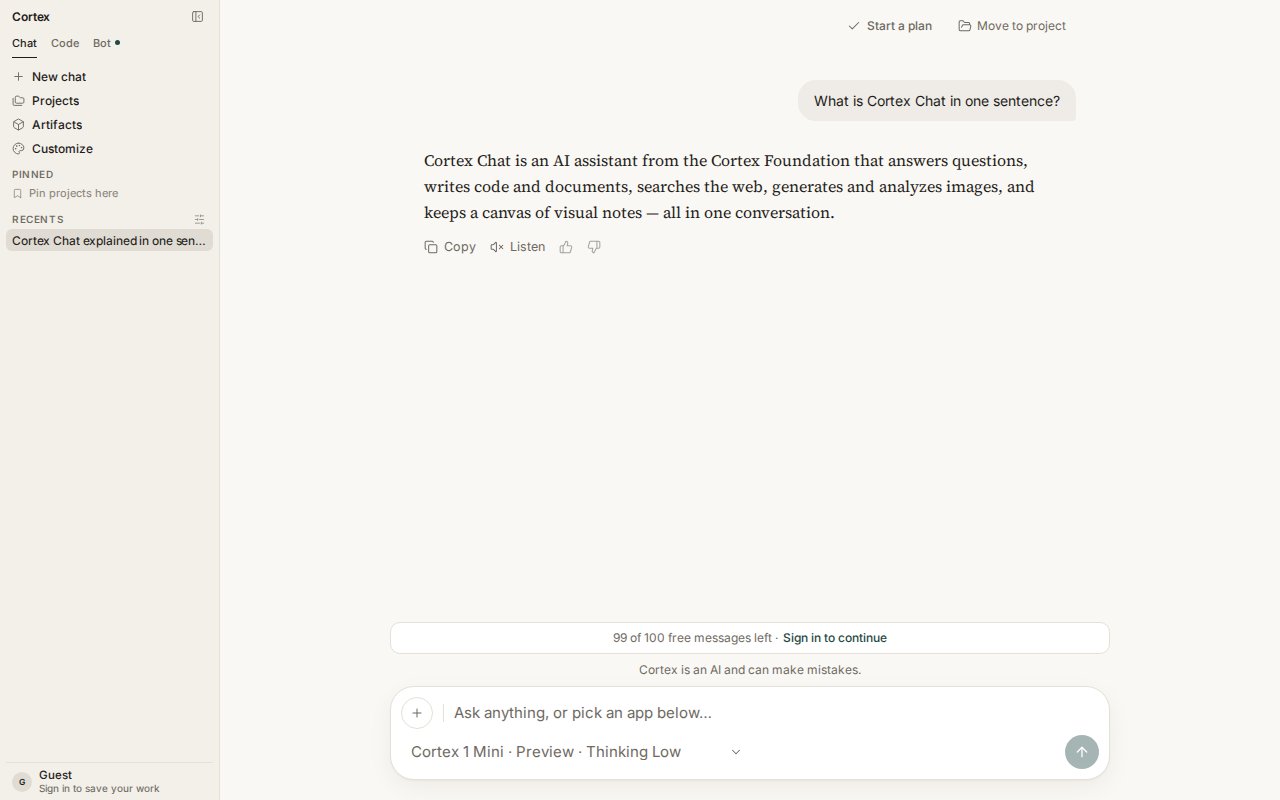
### A thread
Every reply carries **Copy**, **Listen** (when voice is available), and thumbs up or down. The thread header offers **Start a plan** and **Move to project**. Replies render markdown — headings, tables, and syntax-highlighted code blocks with their own **Copy** button.
## Start here
First message, attach a file, pick a model, keep the thread in a project.
Standing instructions, chats, and files kept together.
Built-in tools, connected apps, GitHub, and MCP servers.
## Finding your way around
The sidebar holds everything Chat can open. Three of its entries are worth knowing before you start clicking.
| Entry | What it opens |
| --------------------- | ---------------------------------------------------------------------------------------------------------- |
| **Chat · Code · Bot** | The product switcher. Chat is the default; Code and Bot need a signed-in account. |
| **Projects** | Standing instructions plus the chats and files that belong together. See [Projects](/chat/projects). |
| **Artifacts** | Opens the [Library](/chat/library) — your uploads and everything the assistant produced. |
| **Customize** | **Connectors**: connect apps and choose whether each reaches Chat, Bot, or both. See [Tools](/chat/tools). |
| **Recents** | Your latest conversations. Guests see the current session only. |
**New chat** is an action, not a selected row. **Pinned** collects the projects you use most.
### The composer
* **+** opens **Attach file**, **Image**, and **Check origin**.
* The **model chip** — for example *Cortex 1 Mini · Preview · Thinking Low* — switches model, sets the Thinking level, and toggles **Deep Research**.
* **Enter** sends, **Shift + Enter** adds a line, **Esc** stops a response.
* While a turn runs the placeholder reads **Cortex is responding…** and the send button becomes a stop control.
### The four cards on Chat home
They are shortcuts, not separate products.
| Card | What it does |
| ------------------------------------------------------- | ------------------------------------------------- |
| **Code** — *The Cortex agent working inside your repos* | Opens Cortex Code |
| **Research** — *Cited answers from live sources* | Prefills the composer and turns on Deep Research |
| **Docs** — *Drafts that structure themselves* | Opens a new chat with a document canvas beside it |
| **Agents** — *Background runs on schedules* | Opens Cortex Bot |
### A thread
Every reply carries **Copy**, **Listen** (when voice is available), and thumbs up or down. The thread header offers **Start a plan** and **Move to project**. Replies render markdown — headings, tables, and syntax-highlighted code blocks with their own **Copy** button.
 ## Core guides
Standing instructions, chats, and files kept together. Every chat in a project starts from its instructions.
Everything you uploaded and everything the assistant produced. Files stay when a chat is deleted.
Turn a long answer into steps you can tick off. Start one from any chat or from Planning.
Cortex 1 Mini, Cortex Teutonic-1, the Thinking level, and what happens at peak hours.
Built-in tools, connected apps, GitHub, and MCP servers — and which product each connection reaches.
Chat is per account. What that means for projects, plans, and threads.
## Research and media
Plan the questions, read live sources, write a cited report.
Cortex-Image-1 from the composer. Quota, not a paywall, on Free and Guest.
Ask whether attached media is authentic. Fails closed when it cannot run.
Dictate with the mic and hear answers with Listen — when the deployment supports them.
## Context that carries over
Standing preferences and facts, reviewable and deletable one by one.
A document sidecar beside the conversation, drafted by Cortex or by you.
## When to switch
Chat does not run Code's workspace shell or Bot's computer. Chat's Python tool is a snippet sandbox with no workspace, and it cannot see a repository.
| Stay in Chat | Open Code | Open Bot |
| ----------------------------------------------------------------------- | ------------------------------------------------------------ | ---------------------------------------------------------- |
| Questions, writing, research, pictures, origin checks, documents, plans | A repository, an isolated Cloud guest, diffs, a pull request | An always-on teammate with a computer, routines, approvals |
## Under the hood
* [How Chat works](/chat/how-it-works) — the tool loop, compaction, and Chat's round budget.
* [Streaming](/chat/streaming) — tokens, then tools, then the finished reply; what happens on a dropped connection.
* [Settings](/getting-started/settings) — theme, language, shortcuts, defaults, privacy.
* [Chat troubleshooting](/chat/troubleshooting) — messages that are not errors, and what to do next.
## Next
1. [Chat quickstart](/chat/quickstart) — from an open tab to a useful first conversation.
2. [Projects](/chat/projects) — instructions your chats start from.
3. [Models and thinking](/chat/models) — pick a model per conversation.
4. [Tools and connectors](/chat/tools) — connect an app or an MCP server.
## Core guides
Standing instructions, chats, and files kept together. Every chat in a project starts from its instructions.
Everything you uploaded and everything the assistant produced. Files stay when a chat is deleted.
Turn a long answer into steps you can tick off. Start one from any chat or from Planning.
Cortex 1 Mini, Cortex Teutonic-1, the Thinking level, and what happens at peak hours.
Built-in tools, connected apps, GitHub, and MCP servers — and which product each connection reaches.
Chat is per account. What that means for projects, plans, and threads.
## Research and media
Plan the questions, read live sources, write a cited report.
Cortex-Image-1 from the composer. Quota, not a paywall, on Free and Guest.
Ask whether attached media is authentic. Fails closed when it cannot run.
Dictate with the mic and hear answers with Listen — when the deployment supports them.
## Context that carries over
Standing preferences and facts, reviewable and deletable one by one.
A document sidecar beside the conversation, drafted by Cortex or by you.
## When to switch
Chat does not run Code's workspace shell or Bot's computer. Chat's Python tool is a snippet sandbox with no workspace, and it cannot see a repository.
| Stay in Chat | Open Code | Open Bot |
| ----------------------------------------------------------------------- | ------------------------------------------------------------ | ---------------------------------------------------------- |
| Questions, writing, research, pictures, origin checks, documents, plans | A repository, an isolated Cloud guest, diffs, a pull request | An always-on teammate with a computer, routines, approvals |
## Under the hood
* [How Chat works](/chat/how-it-works) — the tool loop, compaction, and Chat's round budget.
* [Streaming](/chat/streaming) — tokens, then tools, then the finished reply; what happens on a dropped connection.
* [Settings](/getting-started/settings) — theme, language, shortcuts, defaults, privacy.
* [Chat troubleshooting](/chat/troubleshooting) — messages that are not errors, and what to do next.
## Next
1. [Chat quickstart](/chat/quickstart) — from an open tab to a useful first conversation.
2. [Projects](/chat/projects) — instructions your chats start from.
3. [Models and thinking](/chat/models) — pick a model per conversation.
4. [Tools and connectors](/chat/tools) — connect an app or an MCP server.