> ## Documentation Index
> Fetch the complete documentation index at: https://cortex-foundation-add13747-droid-2a5c5e50-docs-ferndesk-pro.mintlify.site/llms.txt
> Use this file to discover all available pages before exploring further.
# Voice
> Dictate with the mic and hear an answer with Listen. Both controls appear only when the deployment can transcribe or speak.
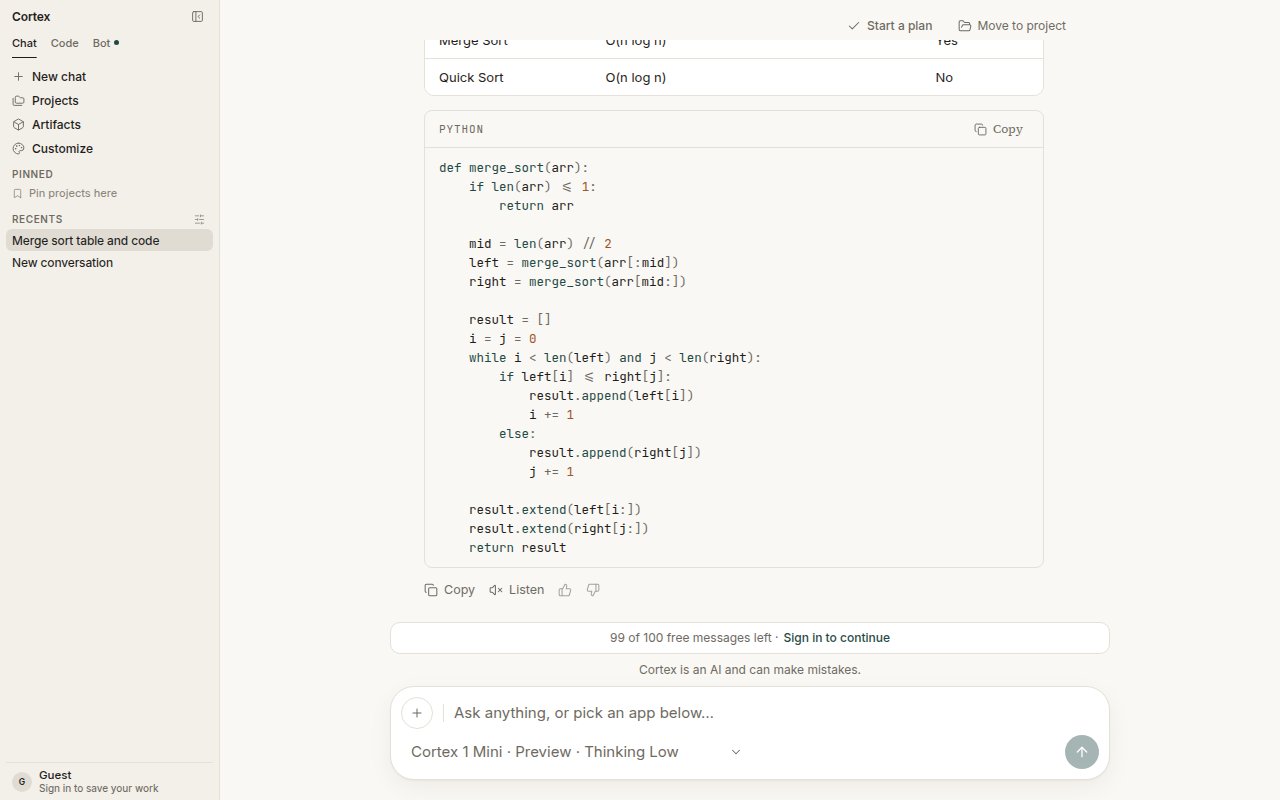
Chat has two voice controls: a **mic** in the composer for dictation, and **Listen** under each answer to hear it read aloud. Each appears only when the deployment behind it can actually do the work.
 ## The controls
| Control | Where | Appears when | What it does |
| ---------- | --------------- | ----------------------------- | ------------------------------------------------------------------------- |
| **Mic** | In the composer | The deployment can transcribe | Turns speech into text in the composer; you still press **Enter** to send |
| **Listen** | Under an answer | The deployment can speak | Reads the answer aloud |
If a control is missing, that capability is switched off for this deployment. There is nothing to configure on your side, and it is not a broken button.
Dictation fills the composer; it does not send the turn. Read what landed there, fix a word if the transcript misheard it, and press **Enter** yourself. **Listen** appears under a finished reply, alongside **Copy** and the feedback controls — see [Streaming](/chat/streaming) for the phases that come before it.
## Where voice lives
| Surface | Dictation | Spoken answers |
| ----------------- | --------------------------------------------------------------------- | ---------------------- |
| Cortex Chat (web) | Yes, when the deployment can transcribe | Yes, when it can speak |
| Code, Bot, Design | No — voice is a Chat control | No |
| CLI | No. The terminal has no mic and no playback — see [The TUI](/cli/tui) | |
Chat's voice controls are the only place these capabilities appear. A session in Code, a bot's conversation, and a terminal session have no equivalent.
## Language
English is the source of truth for spoken and written copy. The interface can be localized under **Settings → General → Language**; model prompts stay in English. See [Settings](/getting-started/settings).
## Related
* [Streaming](/chat/streaming) — answers arrive as text before you can listen to them.
* [Chat troubleshooting](/chat/troubleshooting) — a missing mic or Listen control.
* [Troubleshooting](/getting-started/troubleshooting) — what missing controls mean.
## The controls
| Control | Where | Appears when | What it does |
| ---------- | --------------- | ----------------------------- | ------------------------------------------------------------------------- |
| **Mic** | In the composer | The deployment can transcribe | Turns speech into text in the composer; you still press **Enter** to send |
| **Listen** | Under an answer | The deployment can speak | Reads the answer aloud |
If a control is missing, that capability is switched off for this deployment. There is nothing to configure on your side, and it is not a broken button.
Dictation fills the composer; it does not send the turn. Read what landed there, fix a word if the transcript misheard it, and press **Enter** yourself. **Listen** appears under a finished reply, alongside **Copy** and the feedback controls — see [Streaming](/chat/streaming) for the phases that come before it.
## Where voice lives
| Surface | Dictation | Spoken answers |
| ----------------- | --------------------------------------------------------------------- | ---------------------- |
| Cortex Chat (web) | Yes, when the deployment can transcribe | Yes, when it can speak |
| Code, Bot, Design | No — voice is a Chat control | No |
| CLI | No. The terminal has no mic and no playback — see [The TUI](/cli/tui) | |
Chat's voice controls are the only place these capabilities appear. A session in Code, a bot's conversation, and a terminal session have no equivalent.
## Language
English is the source of truth for spoken and written copy. The interface can be localized under **Settings → General → Language**; model prompts stay in English. See [Settings](/getting-started/settings).
## Related
* [Streaming](/chat/streaming) — answers arrive as text before you can listen to them.
* [Chat troubleshooting](/chat/troubleshooting) — a missing mic or Listen control.
* [Troubleshooting](/getting-started/troubleshooting) — what missing controls mean.