> ## Documentation Index
> Fetch the complete documentation index at: https://cortex-foundation-add13747-droid-2a5c5e50-docs-ferndesk-pro.mintlify.site/llms.txt
> Use this file to discover all available pages before exploring further.
# CLI troubleshooting
> Start with four commands, then work through the messages — the coding service, hosts that refuse, the agent that will not edit, MCP, quotas, timeouts.
## Start here
```bash theme={null}
cortex --version
cortex whoami
cortex debug paths # where config, sessions, logs, and caches are
cortex debug config # the configuration actually in effect
cortex debug system # platform and environment details
cortex logs -n 200 # recent log output
```
For a single run, `-v` and `--trace` increase console verbosity and can expose sensitive context. `--debug` instead records bounded, content-free diagnostics under the Cortex home `diagnostics/` directory (or `CORTEX_DIAGNOSTICS_DIR`); it never uploads anything.
## “The coding service is temporarily unavailable”
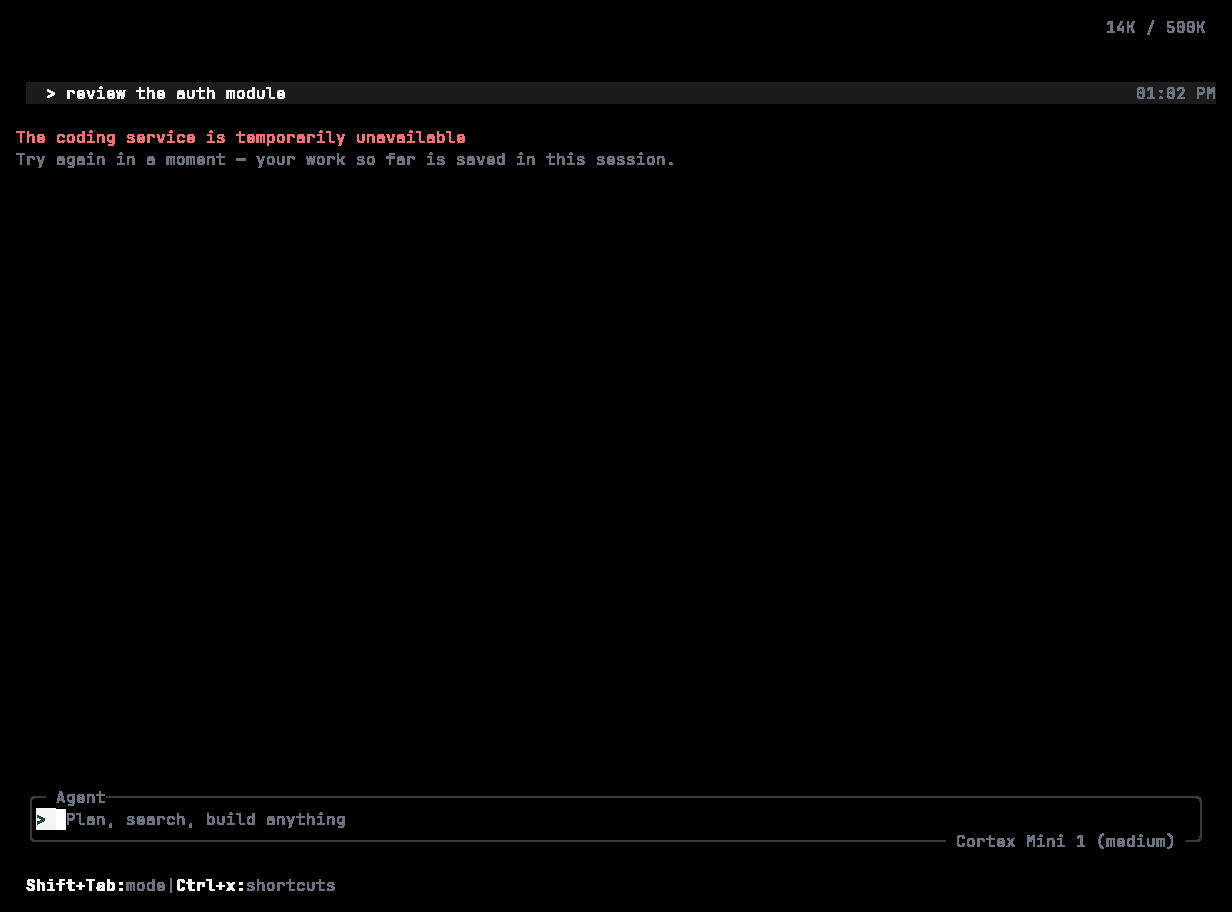 Cortex could not reach the coding API. The message is deliberately the whole story — the CLI does not surface provider, SDK, or transport names.
1. Can this machine reach `api.cortex.foundation`?
2. Is a proxy in the way? Corporate TLS interception can break calls even when browsing works.
3. Is `CORTEX_API_URL` set to something unexpected? `cortex debug config --env` tells you.
4. Are you signed in? `cortex whoami`.
Press **Enter** to retry; the session is saved.
## “This PC and SSH Code execution require an already connected Code session”
You selected This PC or SSH — through `CORTEX_COMPUTER` or `CORTEX_SSH_HOST` — without a connected Code session. Those hosts are never created on the fly, and the Cloud is not substituted. Either resume a session that already has the host, or unset `CORTEX_COMPUTER` to use the Cloud. See [Code on desktop](/code/desktop).
## The TUI will not start
Cortex needs a terminal on both stdin and stdout. In a pipeline, a CI job, or under a wrapper that redirects either, it refuses and points you at [`cortex run` or `cortex exec`](/cli/headless).
## Sign-in problems
See [Sign in → Troubleshooting](/cli/sign-in#troubleshooting).
## The agent will not change anything
Check, in order:
1. **Mode.** Plan and Ask are read-only. **Shift+Tab** to **Agent**.
2. **Sandbox.** `--sandbox read-only` blocks all writes; `workspace-write` confines them to the workspace.
3. **Approval policy.** With `--ask-for-approval never` and no autonomy the agent may be declining rather than prompting.
4. **The `permission` table** in `config.toml` can deny `edit` or specific command patterns outright.
5. **Agent tool access.** An agent with `tools: read-only` cannot write, whatever the session policy says.
6. **Spec mode.** Mutating tools stay locked until the plan is accepted.
`cortex debug config --diff` shows what differs from the defaults.
## A tool is not available
```bash theme={null}
cortex exec --list-tools
```
Something narrowed the set: `--enabled-tools` / `--disabled-tools`, the agent's `tools` field, the current mode, or the `permission` table.
## An edit broke the build
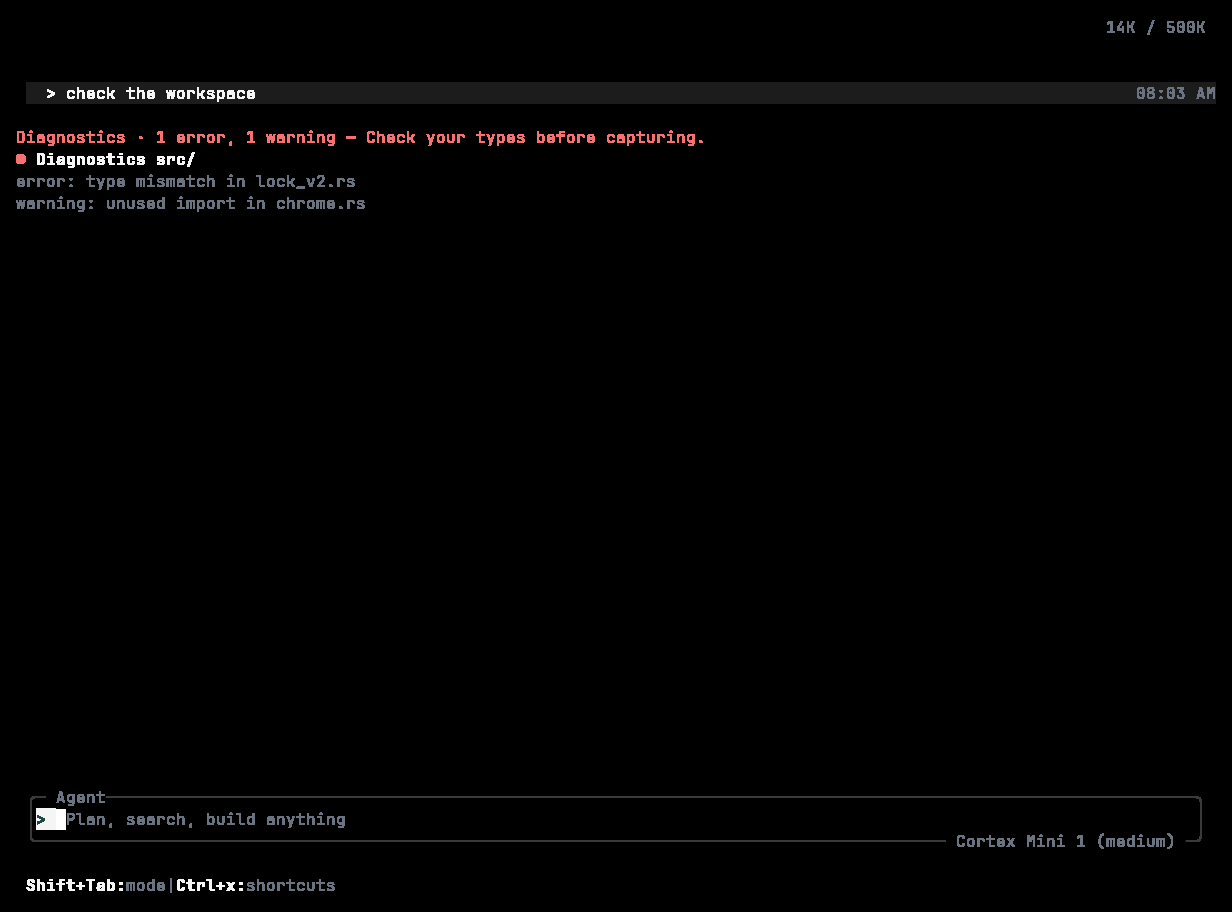
After an edit, a **Diagnostics** row lists compiler errors and warnings with file and line, so the agent — and you — can see what to fix next. `/diagnostics [file]` runs the same check on demand.
Cortex could not reach the coding API. The message is deliberately the whole story — the CLI does not surface provider, SDK, or transport names.
1. Can this machine reach `api.cortex.foundation`?
2. Is a proxy in the way? Corporate TLS interception can break calls even when browsing works.
3. Is `CORTEX_API_URL` set to something unexpected? `cortex debug config --env` tells you.
4. Are you signed in? `cortex whoami`.
Press **Enter** to retry; the session is saved.
## “This PC and SSH Code execution require an already connected Code session”
You selected This PC or SSH — through `CORTEX_COMPUTER` or `CORTEX_SSH_HOST` — without a connected Code session. Those hosts are never created on the fly, and the Cloud is not substituted. Either resume a session that already has the host, or unset `CORTEX_COMPUTER` to use the Cloud. See [Code on desktop](/code/desktop).
## The TUI will not start
Cortex needs a terminal on both stdin and stdout. In a pipeline, a CI job, or under a wrapper that redirects either, it refuses and points you at [`cortex run` or `cortex exec`](/cli/headless).
## Sign-in problems
See [Sign in → Troubleshooting](/cli/sign-in#troubleshooting).
## The agent will not change anything
Check, in order:
1. **Mode.** Plan and Ask are read-only. **Shift+Tab** to **Agent**.
2. **Sandbox.** `--sandbox read-only` blocks all writes; `workspace-write` confines them to the workspace.
3. **Approval policy.** With `--ask-for-approval never` and no autonomy the agent may be declining rather than prompting.
4. **The `permission` table** in `config.toml` can deny `edit` or specific command patterns outright.
5. **Agent tool access.** An agent with `tools: read-only` cannot write, whatever the session policy says.
6. **Spec mode.** Mutating tools stay locked until the plan is accepted.
`cortex debug config --diff` shows what differs from the defaults.
## A tool is not available
```bash theme={null}
cortex exec --list-tools
```
Something narrowed the set: `--enabled-tools` / `--disabled-tools`, the agent's `tools` field, the current mode, or the `permission` table.
## An edit broke the build
After an edit, a **Diagnostics** row lists compiler errors and warnings with file and line, so the agent — and you — can see what to fix next. `/diagnostics [file]` runs the same check on demand.
 ## An MCP server is not connecting
```bash theme={null}
cortex mcp list --all
cortex mcp debug
cortex mcp debug --test-auth --no-cache
```
Common causes: the stdio command is not on `PATH` in the environment Cortex launches it from; a missing `--` in `cortex mcp add` made the server's flags Cortex flags; the URL points at localhost or a private range and needs `--allow-local`; the bearer-token environment variable named in the config is not set. In the TUI, a failed server shows a red `×` in `/mcp` with **r** to reconnect.
## Quota exhausted
## An MCP server is not connecting
```bash theme={null}
cortex mcp list --all
cortex mcp debug
cortex mcp debug --test-auth --no-cache
```
Common causes: the stdio command is not on `PATH` in the environment Cortex launches it from; a missing `--` in `cortex mcp add` made the server's flags Cortex flags; the URL points at localhost or a private range and needs `--allow-local`; the bearer-token environment variable named in the config is not set. In the TUI, a failed server shows a red `×` in `/mcp` with **r** to reconnect.
## Quota exhausted
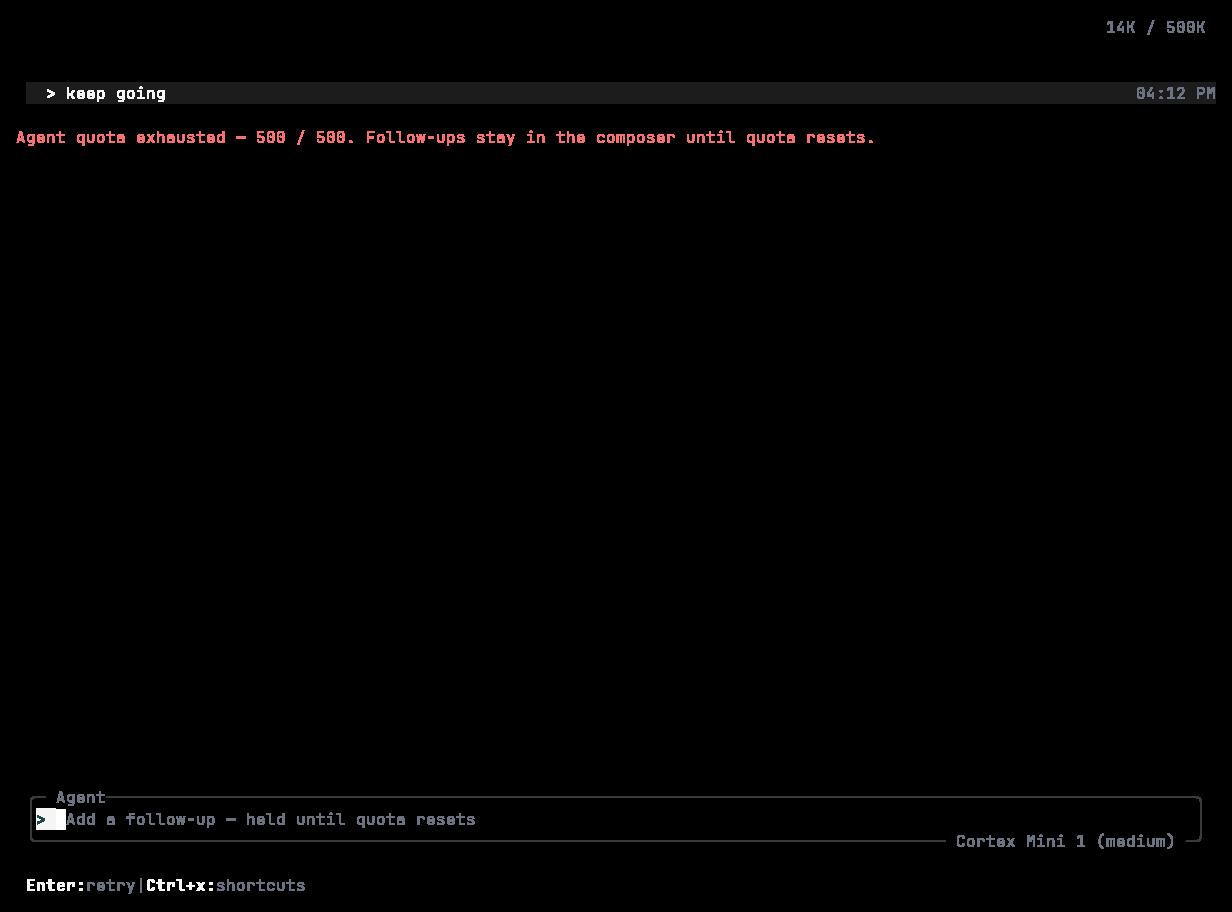 The composer is held — *Add a follow-up — held until quota resets* — and follow-ups queue until the window resets. `/usage` shows the details. Quotas fail closed; see [Plans and quotas](/getting-started/plans).
## A run times out
`cortex exec` defaults to a 600-second timeout and 100 turns.
```bash theme={null}
cortex exec --timeout 1800 --max-turns 40 "large task"
```
If one shell command is the problem, raise `--command-timeout` or `execution.command_timeout_seconds` instead. Splitting a large task into several runs usually beats raising the ceiling.
## Output is truncated or mangled
`--color never` (or `NO_COLOR`) for logs and pipelines. `-o json` or `-o stream-json` when something downstream parses the output; the shape of `text` is not a contract.
## Disk usage keeps growing
```bash theme={null}
cortex compact status
cortex compact run
cortex cache size
cortex cache clear
cortex logs --clear --keep-days 7
```
Lock the sessions you want to keep first: `cortex lock add -r "keep for the audit"`.
## A build from source fails
On Linux the optional audio and desktop crates need ALSA headers: `sudo apt-get install -y libasound2-dev pkg-config`. Use the toolchain pinned in `rust-toolchain.toml`.
## Reporting a problem
```bash theme={null}
cortex feedback bug "describe what happened" --include-logs
```
Or `/bug` in the TUI, or open an issue at [github.com/CortexLM/cli](https://github.com/CortexLM/cli).
## Related
* [Configuration](/cli/configuration) · [Sign in](/cli/sign-in) · [Modes and permissions](/cli/modes-and-permissions)
* [Troubleshooting the web app](/getting-started/troubleshooting)
The composer is held — *Add a follow-up — held until quota resets* — and follow-ups queue until the window resets. `/usage` shows the details. Quotas fail closed; see [Plans and quotas](/getting-started/plans).
## A run times out
`cortex exec` defaults to a 600-second timeout and 100 turns.
```bash theme={null}
cortex exec --timeout 1800 --max-turns 40 "large task"
```
If one shell command is the problem, raise `--command-timeout` or `execution.command_timeout_seconds` instead. Splitting a large task into several runs usually beats raising the ceiling.
## Output is truncated or mangled
`--color never` (or `NO_COLOR`) for logs and pipelines. `-o json` or `-o stream-json` when something downstream parses the output; the shape of `text` is not a contract.
## Disk usage keeps growing
```bash theme={null}
cortex compact status
cortex compact run
cortex cache size
cortex cache clear
cortex logs --clear --keep-days 7
```
Lock the sessions you want to keep first: `cortex lock add -r "keep for the audit"`.
## A build from source fails
On Linux the optional audio and desktop crates need ALSA headers: `sudo apt-get install -y libasound2-dev pkg-config`. Use the toolchain pinned in `rust-toolchain.toml`.
## Reporting a problem
```bash theme={null}
cortex feedback bug "describe what happened" --include-logs
```
Or `/bug` in the TUI, or open an issue at [github.com/CortexLM/cli](https://github.com/CortexLM/cli).
## Related
* [Configuration](/cli/configuration) · [Sign in](/cli/sign-in) · [Modes and permissions](/cli/modes-and-permissions)
* [Troubleshooting the web app](/getting-started/troubleshooting)