> ## Documentation Index
> Fetch the complete documentation index at: https://cortex-foundation-add13747-droid-2a5c5e50-docs-ferndesk-pro.mintlify.site/llms.txt
> Use this file to discover all available pages before exploring further.

# Guides for Chat, Code, Bot, Design, and the CLI

> Product docs for the Cortex app — how to chat, ship code, run bots, design canvases, and drive Code from a terminal. Platform API lives elsewhere.

<code>docs.cortex.foundation</code>

Product docs for the Cortex app — how to chat, ship code, run bots, design canvases, and drive Code from a terminal. One account, one domain. **Platform API lives elsewhere.**
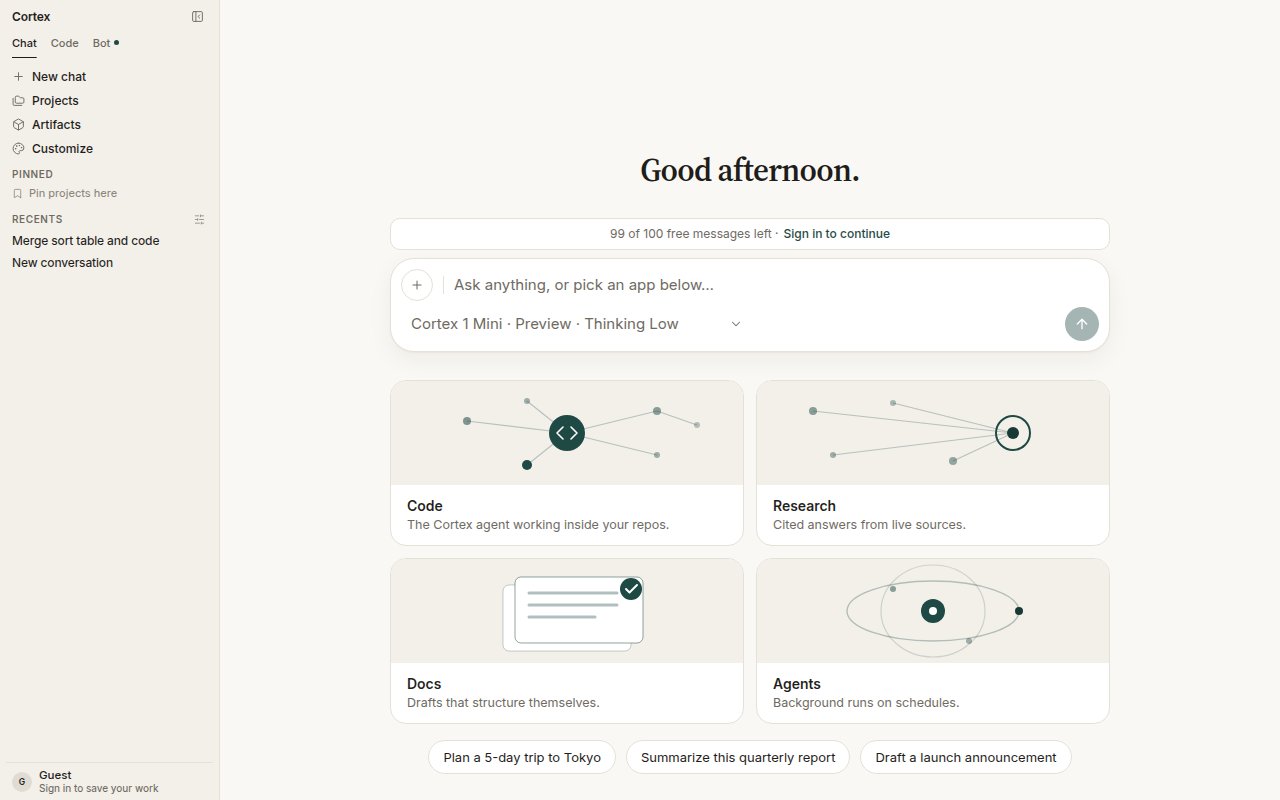
<Frame caption="Cortex Chat home — Chat, Code, and Bot in the sidebar; recent conversations; the composer with its model chip; Code, Research, Docs, and Agents as starting points.">
  <img src="https://mintcdn.com/cortex-foundation-add13747-droid-2a5c5e50-docs-ferndesk-pro/MqnMpE_oEu2JSRan/images/product/chat-home-recents.png?fit=max&auto=format&n=MqnMpE_oEu2JSRan&q=85&s=492c7eb4ca2998be74776d59ff20ef9b" alt="Cortex Chat home with recent conversations in the sidebar and the composer ready" width="1280" height="800" data-path="images/product/chat-home-recents.png" />
</Frame>

<p className="ink-cta-row">
  <a className="ink-btn" href="/getting-started/quickstart">Quickstart</a>
  <a className="ink-btn ink-btn-quiet" href="/getting-started/downloads">Download Cortex</a>
</p>

## Start here

<CardGroup cols={3}>
  <Card title="Getting started" img="https://mintcdn.com/cortex-foundation-add13747-droid-2a5c5e50-docs-ferndesk-pro/MqnMpE_oEu2JSRan/images/banners/getting-started.png?fit=max&auto=format&n=MqnMpE_oEu2JSRan&q=85&s=f4d61c189983982832da6b4ede040d3a" href="/getting-started/quickstart" width="1280" height="853" data-path="images/banners/getting-started.png">
    A first chat as a guest, then sign in for Code, Bot, and Design. Accounts, plans, settings.
  </Card>

  <Card title="Chat" img="https://mintcdn.com/cortex-foundation-add13747-droid-2a5c5e50-docs-ferndesk-pro/MqnMpE_oEu2JSRan/images/banners/chat.png?fit=max&auto=format&n=MqnMpE_oEu2JSRan&q=85&s=13d0d31170d6731dfd4751a1e3fe1fcc" href="/chat" width="1280" height="853" data-path="images/banners/chat.png">
    Projects, Library, plans, models, tools, Deep Research, images, and how a turn runs.
  </Card>

  <Card title="Code" img="https://mintcdn.com/cortex-foundation-add13747-droid-2a5c5e50-docs-ferndesk-pro/MqnMpE_oEu2JSRan/images/banners/code.png?fit=max&auto=format&n=MqnMpE_oEu2JSRan&q=85&s=094a8e38779955fbe5947f64240f9cf2" href="/code" width="1280" height="853" data-path="images/banners/code.png">
    A coding agent in an isolated Cloud guest — sessions, Ask / Plan / Agent, GitHub, review.
  </Card>

  <Card title="Bot" img="https://mintcdn.com/cortex-foundation-add13747-droid-2a5c5e50-docs-ferndesk-pro/MqnMpE_oEu2JSRan/images/banners/bot.png?fit=max&auto=format&n=MqnMpE_oEu2JSRan&q=85&s=d11a004b2d3d16217493ad7f60a80397" href="/bot" width="1280" height="853" data-path="images/banners/bot.png">
    Always-on agents with their own computer, approvals, routines, skills, and the Bot desktop app.
  </Card>

  <Card title="Design" img="https://mintcdn.com/cortex-foundation-add13747-droid-2a5c5e50-docs-ferndesk-pro/QcNTEVKCNeprmmq4/images/banners/design.png?fit=max&auto=format&n=QcNTEVKCNeprmmq4&q=85&s=8990c8ea755a821940aa1a9190cce2da" href="/design" width="1280" height="853" data-path="images/banners/design.png">
    Persistable canvases hosted from Chat or Code, edited in the Design desktop app.
  </Card>

  <Card title="CLI" icon="terminal" href="/cli">
    Cortex Code in the terminal — install, sign in, the TUI, slash commands, `/goal`, headless runs.
  </Card>
</CardGroup>

## Reference

<CardGroup cols={3}>
  <Card title="Troubleshooting" icon="life-buoy" href="/getting-started/troubleshooting">
    What a message means across Chat, Code, and Bot — gates, quotas, reconnects.
  </Card>

  <Card title="Security and privacy" icon="shield-check" href="/security/overview">
    What Cortex stores, cookies and consent, where code runs, export and deletion.
  </Card>

  <Card title="API" icon="braces" href="/api/overview">
    The problem-document format and the public catalog of error codes.
  </Card>

  <Card title="System status" icon="activity" href="/status">
    Live availability for Web, API, Chat, Code, and Bot — incidents and maintenance.
  </Card>

  <Card title="Changelog" icon="history" href="/changelog">
    What shipped in Chat, Code, Bot, Design, and the CLI — dated, with the surface it changed.
  </Card>

  <Card title="Platform API" icon="clock" href="/platform">
    Not available yet. No endpoints, SDKs, or keys — and what to use instead.
  </Card>
</CardGroup>

## Which product do I want?

| You want to…                                                                    | Open              |
| ------------------------------------------------------------------------------- | ----------------- |
| Ask questions, write, research with citations, work with documents and pictures | [Chat](/chat)     |
| Change a repository, run tests, open a pull request                             | [Code](/code)     |
| Delegate ongoing work to an agent that browses, clicks, and runs on a schedule  | [Bot](/bot)       |
| Drive Code from your own terminal, a script, or CI                              | [CLI](/cli)       |
| Lay out frames, notes, and a component library on a board                       | [Design](/design) |

Chat works before you sign in. Code, Bot, and Design need an account — see [Accounts](/getting-started/accounts).

<Note>
  The inference **Platform API** (a public model-inference API) is not documented on this site and is not implemented in this repository. See [Platform API](/platform).
</Note>

## Next

1. [Quickstart](/getting-started/quickstart) — a first Chat, then the surfaces that need an account.
2. [What is Cortex](/getting-started/what-is-cortex) — the products, the models, and the hostnames in one place.
3. [Accounts](/getting-started/accounts) — what a guest can do, and what signing in unlocks.
4. [Downloads](/getting-started/downloads) — the desktop apps and the CLI, when you need a host the browser cannot offer.
5. [Troubleshooting](/getting-started/troubleshooting) — when a message is not an error.
